For employers with staff in Romania · Employee register workflows · Sources reviewed 7 Oct 2026
Employers with staff in Romania, and their contracted providers
Art. 1 · Romania compliance module of RDCopilotOSRomania module · RDCopilotOS
Contract changes, entered once and kept on the record.
RDCopilot REGES prepares register operations from your HR data, has a colleague check them, and keeps the REGES-ONLINE response attached to the change it belongs to. Submissions run through your employer’s own REGES-ONLINE access: by hand, or in API mode set up with the employer’s API keys.
Hire, change, suspension and its end, termination, correction
Review
Four-eyes check before every submission
Evidence
Register response kept with the change
1482
ENTRY RG-2026-001482Outcome confirmed
Employer
Example Services SRL
Employee
Ioana M.
CNP
2•••••••••413
Contract
no. 57 / 1 Sept 2026
Operation
Change — salary
Effective date
1 Oct 2026
Prepared by
HR operator · A. Pop
Checked by
HR lead · M. Ionescu
Response
received 29 Sept 2026 14:19 · confirmed 14:33
Example data. Names and identifiers are invented.
Submissions run through your employer’s own REGES-ONLINE access: by hand, or in API mode set up with the employer’s API keys.
Art. 2
Dated facts. Sources at the foot of the page.
The register moved. The work around it did not.
REGES-ONLINE replaced Revisal as the general employee register. Each hire, change, suspension and termination is still prepared by someone, checked by someone and submitted by a person the employer has designated in writing, or by a contracted provider. That is the part we organise.
1 Apr 2025REGES-ONLINE available to employers and employees (HG 295/2025, Monitorul Oficial no. 279/31.03.2025).[1]
31 Dec 2025Deadline for employers to register in REGES-ONLINE and complete active contracts (HG 295/2025 art. 11, extended by OUG 46/2025).[1][7]
1 Jan 2026Revisal no longer available; all employee-register reporting runs only through REGES-ONLINE.[8]
2 Apr 2026HG 295/2025 annulled at first instance (Constanța Court of Appeal); not final, suspension refused, so reporting in REGES-ONLINE continues.[9]
TodayInteroperable HR software can send contract data through the API keys and external-system credentials the employer generates in REGES-ONLINE.[4]
For whom
In-house HR team
You prepare register changes for your own company and want each one checked and filed with its response.See the register
Contracted provider (payroll, accounting or HR firm)
You complete and submit register data for several employers under service contracts and need access kept separate per employer and per designated colleague.See roles and access
Employer representative
You sign off, give access and want to see who did what, and when.See an example record
Art. 3
Six operation types, one row each.
Operations we prepare, check and track
Each operation starts from a change in your HR data and ends with the register’s response attached. The specialist responsible confirms the legal basis and timing for each case.
Operations in scope are confirmed during discovery against the current official documentation. Operations are sent in the order they happened, as HG 295/2025 requires.
No.
Operation
Typical source in HR
Fields that change
Supporting document
Checked by
Details
01
Hire
Typical source in HRNew employee file
Fields that changeContract number and date, start date, COR occupation, contract type and duration, workplace, working time, gross base salary and allowances
Completion: outcome confirmed only with the agreed evidence
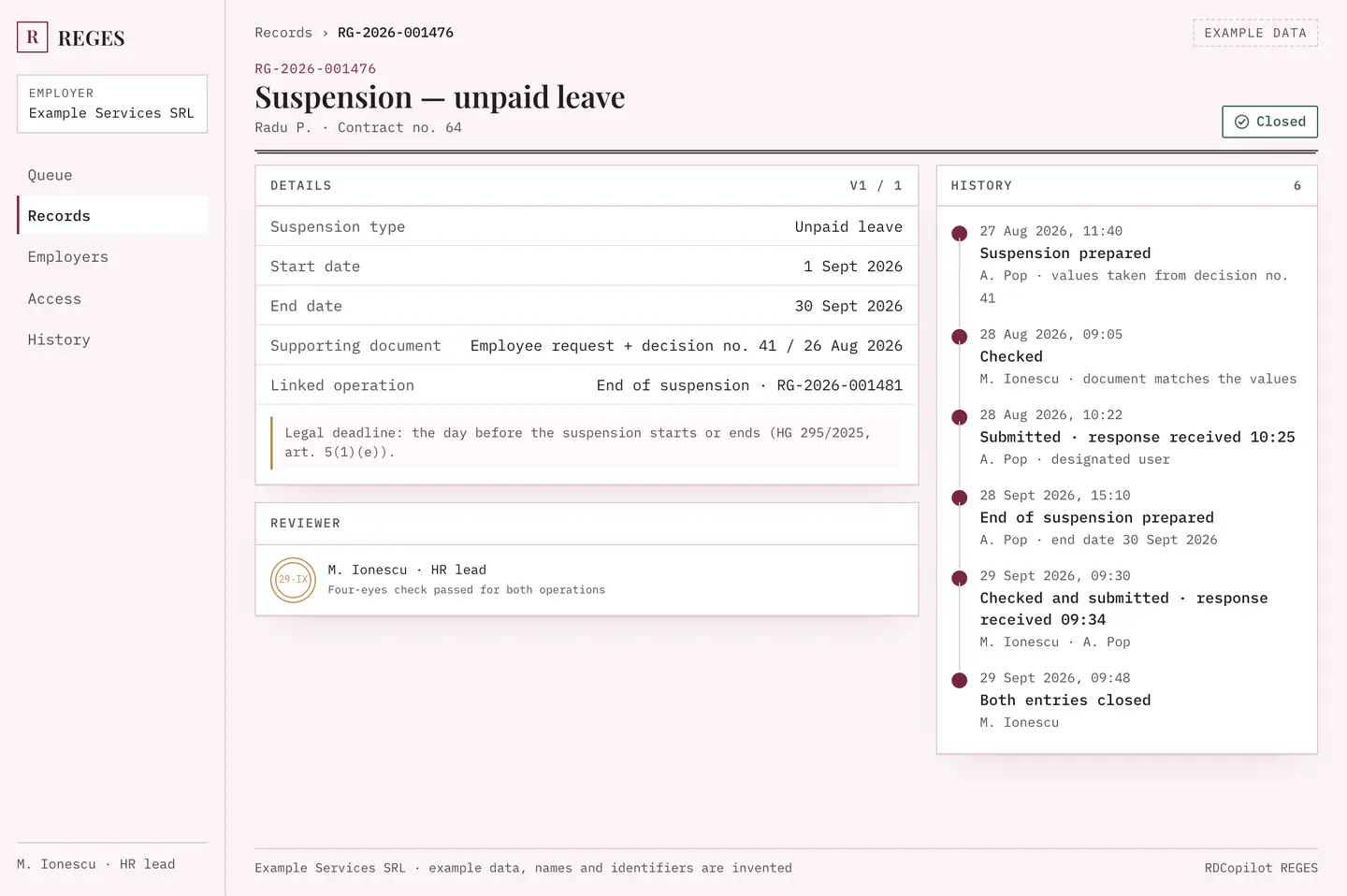
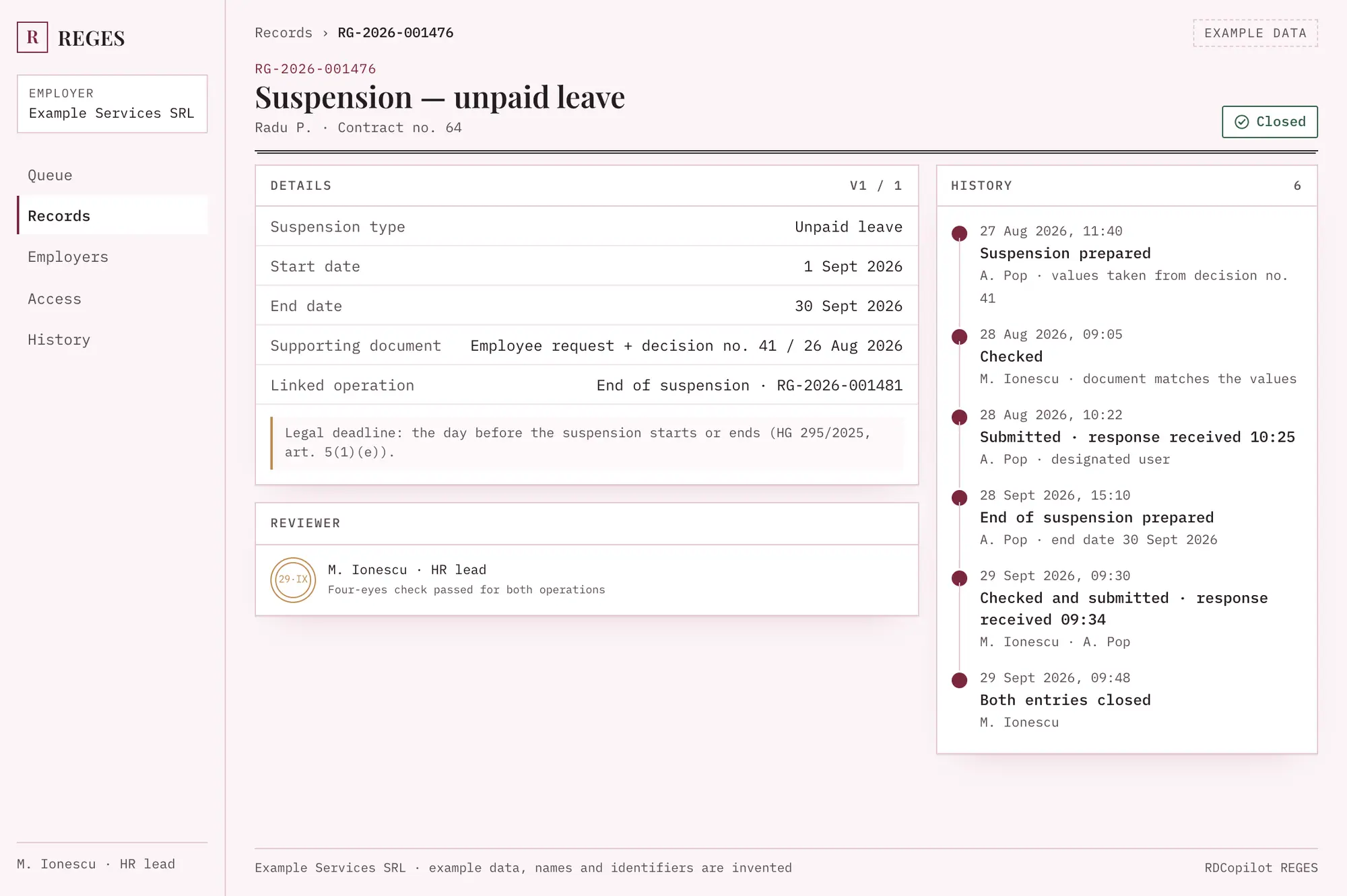
Legal deadline: the day before; medical leave or unjustified absence within 3 working days of registration; force majeure within 3 working days of the suspension (HG 295/2025, art. 5(1)(e)).
The suspension stays open on the contract until its end or a termination closes it.
Completion: outcome confirmed only with the agreed evidence
Legal deadline: the day before; medical leave or unjustified absence within 3 working days of registration; force majeure within 3 working days of the suspension (HG 295/2025, art. 5(1)(e)).
Closes the suspension it ends, so both are read together.
05
Termination
Typical source in HRTermination decision
Fields that changeEnd date, legal basis as set by specialist
Completion: outcome confirmed only with the agreed evidence
Legal deadline: the day the error is found (HG 295/2025, art. 5(8)).
In RDCopilot a correction is a new linked version; the earlier entry stays in the history.
Art. 4
Example record RG-2026-001482.
One change, from amendment to register response
Step through an example salary change. The record keeps what was there before, what changed, who checked it and what the register answered.
RG-2026-001482 · Contract no. 57Version 2 of 2
Amendment as the register sees it: values before and after
Field
Before
After
Salary
Beforeremoved: −RON 6,200
Afteradded: +RON 6,850
Role
Human resources officer (COR 333304) unchanged
Working time
8 h/day unchanged
Effective date
Before—
Afteradded: +1 Oct 2026
Supporting document
Amendment no. 3 / 22 Sept 2026 · PDF · 2 pages
Version 1 · 1 Sept 2026→Version 2 · 22 Sept 2026
1482
RDCOPILOT RECORD SUMMARY
Record ID
RG-2026-001482
Operation
Change — salary
Response received
29 Sept 2026 14:19
Filed with
Contract no. 57, version 2
Status
Outcome confirmed29 Sept 2026 14:33
Example data. The seal shows the time the outcome was confirmed.
State 1: Prepared
22 Sept 2026 16:05 · A. Pop, HR operator
Values taken from the approved amendment.
State 2: Checked
23 Sept 2026 09:12 · M. Ionescu, HR lead
Four-eyes check passed. Document matches the values.
State 3: Submitted
29 Sept 2026 14:16 · A. Pop, designated user
Submitted in REGES-ONLINE by the user the employer designated in writing (manual or API mode, see Art. 7). Attempt no. 1.
Mode: manual · response attached by A. PopIn API mode: set up with the external-system credentials the employer generates in REGES-ONLINE, tied to the designated user’s ID.
State 4: Response received
29 Sept 2026 14:19
Register response stored with the entry.
Needs reconciliation if needed
If the response is missing or unclear, the entry waits in a queue with an owner. It never shows as done by itself.
State 5: Outcome confirmed
29 Sept 2026 14:33 · M. Ionescu
Response checked against the change and filed. Entry closed.
Submission always runs through the employer’s own REGES-ONLINE access, by the designated user by hand or in API mode.
Art. 5
§1–§3 · what the licence covers, and how it compares.
Three parts, one record
§1
HR-to-register mapping
We map the fields of your HR system or spreadsheet to register operations: employer, employee and contract identities stay separate, and values that need a specialist’s judgement are flagged instead of copied.
Field dictionary per operation
Code lists such as COR matched during mapping and checked by your specialist
Unmatched records queue
HRRole = “HR officer”
↓
RegisterCOR 333304Checked
§2
Controlled submission preparation
Every operation is prepared from an approved change and checked by a second person before it goes to the designated user. Corrections become new versions linked to the original.
Four-eyes check
Versioned proposals
Supporting document attached
RG-…1482ChangeChecked
RG-…1483HireAwaiting check
RG-…1484CorrectionPrepared
§3
Status and evidence workflow
Each entry moves through clear states, from prepared to outcome confirmed. The register’s response stays with the change, and anything uncertain waits in a reconciliation queue with an owner.
Register response filed per entry
Attempt history
Change history available to authorised reviewers
Matches the employer journal in REGES-ONLINE
Prepared
Checked
Submitted
Response received
Outcome confirmed
The same operation, two ways
A qualitative comparison, no estimates.
Spreadsheet and manual entry compared with RDCopilot REGES
Spreadsheet and manual entry
With RDCopilot REGES
Where values come from
Manual—Retyped from the HR file
RDCopilot REGES✓Taken once from the approved change
Second check
Manual—Arranged case by case
RDCopilot REGES✓Required before submission
Supporting document
Manual—In a separate folder
RDCopilot REGES✓Attached to the entry
Register response
Manual—Screenshot or email, if kept
RDCopilot REGES✓Filed with the change
Corrections
Manual—Earlier value overwritten
RDCopilot REGES✓New linked version
Who did what
Manual—Depends on how access is shared
RDCopilot REGES✓Named person per action
Fig. 2
Screens from the product UI.
The record in the product
reges.rdcopilot.com
Plate 1 · REG · Example data. Suspension record with its end date, reviewer and history.Open full size (Plate 1)
REGES · Work queue3 employers · 6 open and recent
All 6To check 1Reconcile 1
Example work queue: register entries across three employers with state and owner
Entry
Employer
Operation
Employee
Effective
State
Owner
RG-2026-001485
Example Retail SRL
Termination
Mihai D.
2 Oct 2026
Needs reconciliation
R. Dinu
RG-2026-001484
Example Logistics SRL
Correction
Elena V.
15 Sept 2026
Prepared
A. Pop
RG-2026-001483
Example Services SRL
Hire
Radu T.
13 Oct 2026
Awaiting check
M. Ionescu
RG-2026-001482
Example Services SRL
Change — salary
Ioana M.
1 Oct 2026
Outcome confirmed
M. Ionescu
RG-2026-001479
Example Logistics SRL
Change — working time
Sorina P.
1 Oct 2026
Submitted
A. Pop
RG-2026-001476
Example Services SRL
End of suspension
Andrei C.
1 Oct 2026
Outcome confirmed
M. Ionescu
Plate 2 · REG · Example data. One queue across employers: every entry shows its state and a named owner, and a missing response waits for reconciliation instead of showing as done.
REGES · Access
Example access matrix: which person may prepare, check or submit for which employer
Person
Example Services
Example Logistics
Example Retail
A. PopHR operator · designated user
Example ServicesPrepareSubmit
Example LogisticsPrepare
Example Retail—no access
M. IonescuHR lead
Example ServicesCheck
Example LogisticsCheck
Example Retail—no access
E. StanHR operator
Example Services—no access
Example Logistics—no access
Example RetailPrepare
R. DinuHR lead · designated user
Example Services—no access
Example Logistics—no access
Example RetailCheckSubmit
Every access given or withdrawn is logged with person, employer and time.
Plate 3 · REG · Example data. Access per employer and per person: who may prepare, check or submit, and for which employer.
Screens from the product UI with example data. Names and identifiers are invented.
Art. 6
Four steps, each with a named owner.
How a change reaches the register
I
I. Change approved in HR
The amendment or decision is approved in your HR system or file.
Who HR
II
II. Prepared and checked
RDCopilot prepares the register operation; a colleague checks values against the document.
Who HR operator + HR lead
III
III. Submitted by the designated user
A person the employer designated in writing, or a contracted provider, submits the operation: by hand in REGES-ONLINE, or through API mode set up with the employer’s REGES-ONLINE API keys.
Who Designated user
IV
IV. Response filed
The register’s response is attached to the change and the entry is closed or sent to reconciliation.
Who HR lead
Art. 7
Two submission modes, defined once.
Who does what, for which employer
Access is set per employer, per person and per action. Contracted providers working for several employers see only the employers assigned to them.
HR operator
Prepares operations, attaches documents.
HR lead (reviewer)
Checks values, approves or returns with a note.
Designated user (employee or contracted provider)
Submits in REGES-ONLINE for the employer, designated in writing, in either mode below.
Legal representative or empowered person
Starts and ends delegations, signs in with ROeID or a qualified signature, reads the full history.
Submission modes
(a) Manual
The designated user submits the prepared operation in REGES-ONLINE. The register’s response is then attached to the entry in RDCopilot.
(b) API
API mode uses the user ID and employer ID from the REGES-ONLINE API keys and the external-system credentials your employer generates, so API access stays tied to the designated user and the employer. The response is attached to the entry and checked before the entry closes.
Which mode applies to which operation is agreed during discovery against the current official documentation. Branches with hiring authority can be set up as their own employer context.
REGES-ONLINE credentials are held as a per-employer reference in secured configuration, never in tickets, notes or emails.
Every action logged with person, employer and time.
When someone leaves, their RDCopilot access is withdrawn and the employer’s representative ends their REGES-ONLINE delegation (Registers › Delegates).
REGES-ONLINE (Inspecția Muncii)Connects through your employer’s REGES-ONLINE API keys, following the technical specifications published by Inspecția Muncii.
One register record, fed by the products you already use.
Art. 9
One setup fee, one monthly licence. Hosting and access.
Terms of implementation
Hosted in the EU
Data stored and processed in EU data centres.
Role-based access
Per employer, per person, per action.
Full change history
Every version, attempt and response kept.
Support in English or Romanian
From the team that implements it and knows the register vocabulary.
Data processing agreement
Data processing terms under GDPR Art. 28 are provided with the offer.
Schedule
I
I. Discovery: operations in scope, roles, current HR source, access arrangement and submission mode per operation.
II
II. Mapping: field dictionary, identities, document rules, review steps.
III
III. Pilot on one operation type with your team, end to end to the response.
IV
IV. Remaining operations, access review, handover and go-live.
Example schedule. Phases and dates are confirmed in your offer.
One setup fee, one monthly licence
Setup fee
Discovery, mapping, pilot and go-live, quoted once.
Monthly licence
The workflow, hosting in the EU, updates and support.
Support
In English or Romanian, from the team that implements it.
Scope and availability are confirmed with your offer.
Annex A
Eight questions we are asked before an offer.
Annex A · Questions
A.1Does this replace REGES-ONLINE?
No. REGES-ONLINE remains the legal register run by Inspecția Muncii. RDCopilot REGES prepares and checks each operation and keeps the register’s response with the change; the obligation to submit stays with the employer.
A.2Who submits to the register?
A person the employer has designated in writing, or a contracted provider’s designated employee. In manual mode that person submits in REGES-ONLINE. In API mode, submission uses the API keys and external-system credentials the employer generates in REGES-ONLINE, tied to the designated user’s ID and the employer ID. Either way, the RDCopilot history shows who prepared, checked and submitted each operation, and for which employer (see Art. 7).
A.3Do you connect through the REGES-ONLINE API?
API mode is set up with the API keys and external-system credentials your employer generates in REGES-ONLINE, following the official technical specifications. Operations you prefer to submit by hand stay manual, and the record still keeps the register’s response.
A.4What happens if the register rejects an operation or does not answer?
The entry does not show as done. It moves to a reconciliation queue with an owner, the response (or its absence) is kept, and a correction is prepared as a new version linked to the original. Warnings REGES-ONLINE raises, such as a salary below the national minimum, are kept with the entry and resolved before it closes.
A.5We already use an HR or payroll system. Do we have to change it?
No. We map your current system or spreadsheet to register operations. We map RDCopilot HR or Payroll the same way as any other source. Your Revisal history is already in REGES-ONLINE, so nothing needs to be migrated there.
A.6We are a payroll or accounting provider working for several employers. Does it fit?
Yes. Access is set per employer and per person, so each colleague sees only the employers assigned to them, and every action is logged under the right employer. Under HG 295/2025 your designated employees submit for each employer, the service cannot be subcontracted, and public institutions keep the register in-house.
A.7Does it replace our HR specialist or lawyer?
No. It prepares, checks and keeps the evidence, but it does not replace legal or HR advice. Your specialist decides the legal basis and timing of each operation, and the employer stays responsible for the data.
A.8Where is the data stored and how is it priced?
Data is hosted in the EU. Pricing is a one-off setup fee plus a monthly licence, quoted after a short discovery call.
Art. 10
Closing article.
Closing article
Bring your next register change to us.
Tell us which operations you handle, how many employers you work for and where your HR data lives. We reply with a scoped offer: setup, monthly licence and a plan with the phases confirmed.
RDCopilot REGES supports your team’s work; it does not replace legal or HR advice. Under HG 295/2025 the employer remains solely responsible for the data sent to the register. The responsible specialist confirms the legal basis and timing for each operation. RDCopilot is not affiliated with Inspecția Muncii.